Complete smart home essentials for beginners in 2026: smart speaker, smart plugs, smart lights, video doorbell, and smart thermostat working together in a modern living room.
Building a smart home in 2026 is easier and cheaper than most people think. What used to cost thousands of dollars and require professional installation can now be done for a few hundred bucks — and set up in a single weekend. This smart home essentials guide walks you through every step, from your first smart plug to a fully automated house that responds to your voice, saves energy, and makes daily life easier.
I’ve tested dozens of smart home devices over the past two years. This guide cuts through the noise — no unnecessary gear, no confusing jargon, just the smart home essentials that actually make a difference. Whether you’re in a studio apartment or a three-bedroom house, this step-by-step plan works.
What’s in This Smart Home Guide?
- Where to Start: The First 3 Smart Home Devices
- Choosing Your Smart Home Ecosystem: Alexa vs Google vs Apple
- Smart Plugs: The $13 Device That Starts It All
- Smart Speakers and Displays: Your Voice Command Center
- Smart Lighting for Every Room: Bulbs, Strips, and Switches
- Smart Home Security on a Budget: Cameras, Doorbells, Sensors
- Smart Thermostats That Pay for Themselves
- Room-by-Room Smart Home Setup: What Goes Where
- 5 Smart Home Mistakes Beginners Make (And How to Avoid Them)
- Budget Breakdown: Complete Smart Home Under $500
- Frequently Asked Questions About Smart Homes
Where to Start: The First 3 Smart Home Devices
When you’re building a smart home from scratch, the biggest mistake is buying too much at once. I’ve seen people order six devices on day one, get overwhelmed, and give up. Don’t do that. Start with these three devices — in this exact order — and you’ll have a rock-solid foundation.
Step 1: A Smart Speaker — Your Voice Command Hub
Every smart home needs a brain. A smart speaker acts as the central voice controller for everything you’ll add later. It answers questions, sets timers, plays music, reads the news, and — most importantly — controls all your other smart devices with simple voice commands. No phone required. Just speak.
What to buy: Echo Dot (5th Gen) at $39.99 or Google Nest Mini at $34.99. Both are excellent. Read the full comparison: Best Smart Speakers 2026: Alexa vs Google vs Apple Compared.
Step 2: A Smart Plug — Instant Automation for Any Appliance
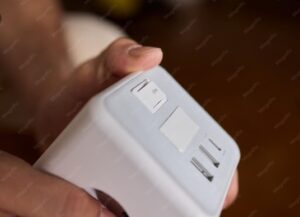
A smart plug is the cheapest, simplest way to make any device “smart.” Plug your floor lamp, coffee maker, or fan into it, and you can control that appliance from your phone or with your voice. No wiring. No tools. No stress. It’s the perfect first device because you’ll see immediate results — walk into a dark apartment and say “Alexa, turn on the lights.” Magic.
What to buy: TP-Link Kasa EP25 at $12.99 — compact, reliable, and includes energy monitoring. See all top picks: Best Smart Plugs 2026: Top 5 Under $25.
Step 3: A Smart Bulb — Transform Any Room’s Atmosphere
Smart lighting changes how a room feels instantly. Dim the lights for movie night without leaving the couch. Set them to wake you up gently with a sunrise simulation. Change colors for a party. Once you’ve experienced walking into a automatically lit room, you’ll wonder why you waited so long.
What to buy: Start with a single color-changing bulb in your living room or bedroom. Read our full guide: Best Smart Lights 2026: Budget to Premium Picks.
Choosing Your Smart Home Ecosystem: Alexa vs Google vs Apple
This is the most important decision you’ll make for your smart home. Your ecosystem determines which devices work together, how you control them, and how much you’ll spend. Switching later means replacing everything — so choose carefully now.
| Ecosystem | Best For | Starting Device | Compatible Devices | Price |
|---|---|---|---|---|
| Amazon Alexa | Most compatible, budget-friendly | Echo Dot (5th Gen) | 100,000+ products | $39.99 |
| Google Home | Smartest voice assistant, Android users | Nest Mini (2nd Gen) | 50,000+ products | $34.99 |
| Apple HomeKit | Privacy-focused, iPhone users | HomePod Mini | 10,000+ products | $99.00 |
My recommendation: If you want the widest device selection at the lowest prices, go with Alexa. If you value the smartest voice assistant and use Android, pick Google. If privacy is your top concern and you’re an iPhone user, Apple HomeKit is the clear winner — though it costs more.
Still undecided? I compared them head-to-head with real-world testing: Alexa vs Google Home: Which Smart Home Ecosystem Wins in 2026?
Smart Plugs: The $13 Device That Starts It All
A smart plug is the gateway device for most smart home beginners — and for good reason. It costs less than a takeout meal, takes 60 seconds to set up, and instantly gives you remote control over anything that plugs into a wall outlet. If you’re wondering where to start your smart home journey, this is it.
What Can You Actually Do With a Smart Plug?
- Schedule lights to turn on at sunset and off at bedtime — never come home to a dark house
- Set your coffee maker to start brewing before your morning alarm
- Control holiday decorations with your voice — no more crawling under the tree
- Monitor energy usage and identify appliances that are quietly running up your electric bill
- Simulate someone being home while you’re on vacation by randomly turning lights on and off
Ready to buy? I tested the top 5 smart plugs for three weeks: Best Smart Plugs 2026: Top 5 Picks Under $25.
Smart Speakers and Displays: Your Voice Command Center
Your smart home needs a voice hub — a device that listens for commands and controls everything else. Smart speakers handle this with just audio. Smart displays add a screen for video calls, recipe browsing, security camera feeds, and visual responses to questions.
Speaker vs Display: Which One Do You Need?
- Get a speaker for bedrooms, bathrooms, and hallways — places where you just want voice control and music
- Get a display for the kitchen (recipes, timers, video calls while cooking) and as a security camera monitor in the living room
My top picks for every room: Read the full breakdown with sound quality comparisons in Best Smart Speakers 2026.
Smart Lighting for Every Room: Bulbs, Strips, and Switches
Smart lighting is where your smart home goes from practical to magical. Walk into a room and lights turn on automatically. Say “goodnight” and the entire house dims. Wake up to a gentle sunrise simulation instead of a blaring alarm. It’s one of the most impactful smart home upgrades you can make.
Smart Bulbs vs Smart Switches: Which Is Right for You?
| Option | Best For | Cost | Installation | Renter-Friendly? |
|---|---|---|---|---|
| Smart Bulbs | Renters, color changing, single lamps | $8–$40 per bulb | Screw in — no tools needed | ✅ Yes |
| Smart Switches | Homeowners, whole-room control | $20–$60 per switch | Electrical wiring required | ❌ No |
| Smart Light Strips | Accent lighting, desks, TV backlighting | $15–$50 per strip | Peel and stick — no tools | ✅ Yes |
My recommendation: If you rent, stick with smart bulbs. If you own your home, smart switches give you cleaner control — the wall switch still works normally for guests. Read the full guide: Best Smart Lights 2026: Budget to Premium.
Smart Home Security on a Budget: Cameras, Doorbells, Sensors
You don’t need an expensive professionally installed system to secure your smart home. Three well-placed devices give you real peace of mind — without monthly subscription fees if you choose wisely.
The Minimalist Smart Security Setup:
- Video doorbell — See and speak to anyone at your door from anywhere. Motion alerts tell you when a package arrives — or when someone’s snooping.
- Indoor camera — Check on pets during the day, peek in on kids after school, or monitor your home while traveling. Look for models with privacy shutters.
- Contact sensors — Small sensors on doors and windows that alert your phone the moment they open. Perfect for back doors, garage entries, and ground-floor windows.
Total cost for all three: Under $150. See specific product recommendations: Smart Home Security on a Budget: Cameras, Doorbells & Sensors.
Smart Thermostats That Pay for Themselves
A smart thermostat is the rare smart home device that literally saves you more money than it costs. By learning your schedule and automatically adjusting temperatures, a smart thermostat cuts heating and cooling costs by 10–15% annually. For the average US household spending $1,200 per year on energy, that’s $120–$180 back in your pocket — every single year.
Compatibility check before buying: Most homes with central heating and cooling built after 2000 are compatible. Look for a C-wire behind your current thermostat. If you don’t have one, some models include adapters or work without it.
Read the full guide: Best Smart Thermostats 2026: Save Money on Energy Bills.
Room-by-Room Smart Home Setup: What Goes Where
Every room in your smart home serves a different purpose. Here’s exactly what belongs in each space — and what’s overkill.
Living Room
- Smart speaker or display — your main voice hub
- Smart plug for floor lamp — voice-controlled lighting instantly
- Smart bulb in the main ceiling fixture — dim for movie night
- Smart TV or streaming stick — most modern TVs already have this built in
Kitchen
- Smart display — recipes, timers, shopping lists, video calls while cooking
- Smart plug for coffee maker — wake up to fresh coffee automatically
- Under-cabinet smart light strips — excellent task lighting, easy peel-and-stick install
Bedroom
- Smart bulb with sunrise wake-up — wake up naturally, not to a jarring alarm
- Smart plug for white noise machine or fan — schedule it to turn off after you fall asleep
- Compact smart speaker — morning alarms, weather, news briefing while you get ready
Home Office
- Smart plug for desk setup — turn off monitor, lamp, and charger with one command at end of day
- Smart speaker — hands-free timers for focused work sessions, quick questions without breaking flow
- Smart light strip behind monitor — bias lighting reduces eye strain during long work sessions
For a deeper dive into home office setups, see: Home Office Setup Guide 2026.
Entryway / Front Door
- Video doorbell — see and talk to visitors from anywhere
- Smart lock — keyless entry, temporary codes for guests or dog walkers
- Motion sensor — triggers hallway light when you walk in with hands full
5 Smart Home Mistakes Beginners Make (And How to Avoid Them)
I’ve made these mistakes so you don’t have to. Here’s what trips up most smart home beginners:
- Buying devices from different ecosystems. A Google speaker can’t control an Apple-exclusive device. Pick one ecosystem and stick with it. Check compatibility before every purchase.
- Creating overly complex routines. “Turn on porch light at sunset” is bulletproof. A 20-step “movie night” routine that dims lights, closes blinds, turns on the TV, and starts popcorn will break constantly. Start simple.
- Ignoring weak WiFi. Smart devices live and die by WiFi signal. If your bedroom has spotty coverage, your smart plug will disconnect at the worst moment. Fix WiFi dead zones with a mesh system before adding devices.
- Removing manual controls entirely. Guests, family members, and babysitters should still be able to turn lights on with a switch. Smart bulbs should work with existing switches — not replace them.
- Buying everything at once. Start with three devices. Live with them for a week. Figure out what you actually use. Then expand slowly. Most people buy gear they never automate.
Full breakdown with solutions: Smart Home Mistakes Beginners Make (And How to Avoid Them).
Budget Breakdown: Complete Smart Home Under $500
Here’s exactly what a complete smart home costs in 2026 — using quality devices I’ve personally tested. No filler. No unnecessary gadgets. Just the smart home essentials.
| Device | Recommended Product | Price |
|---|---|---|
| Smart Speaker | Echo Dot (5th Gen) | $39.99 |
| Smart Plugs (x3) | TP-Link Kasa EP25 | $38.97 |
| Smart Bulbs (x4) | Wyze Bulb Color | $47.96 |
| Video Doorbell | Blink Video Doorbell | $49.99 |
| Smart Display (Kitchen) | Echo Show 5 (3rd Gen) | $59.99 |
| Smart Thermostat | Amazon Smart Thermostat | $59.99 |
| TOTAL SMART HOME COST | $296.89 | |
That’s a full smart home — voice control, automated lighting, security, and energy savings — for under $300. Even adding premium upgrades keeps you comfortably under $500. Most people spend more on coffee in a year.
Frequently Asked Questions About Smart Homes
What are the first 3 smart home devices I should buy?
Start with a smart speaker (Echo Dot or Nest Mini), a smart plug (TP-Link Kasa EP25), and a smart bulb. This trio gives you voice control, appliance automation, and smart lighting — all for under $70 total. Master these three before buying anything else.
How much does a complete smart home cost?
A full smart home with speaker, plugs, lights, security, display, and thermostat costs $296.89 using the products in our budget breakdown above. You can start with a single $12.99 smart plug and build from there. There’s no minimum entry price.
Which is better: Alexa, Google Home, or Apple HomeKit?
Alexa works with the most smart home devices (100,000+) and is the most budget-friendly. Google Assistant is smarter at understanding natural language and answering questions. Apple HomeKit is the most private. Choose based on your phone and privacy preferences. See the full comparison: Alexa vs Google Home.
Can I build a smart home if I rent?
Absolutely. Use smart plugs, smart bulbs, and voice-controlled speakers — none of which require drilling or wiring. Avoid smart switches, wired doorbells, and smart locks that replace existing hardware. Read the full renter’s guide: Renter-Friendly Smart Home.
Do smart homes actually save money?
Yes. A smart thermostat alone saves 10–15% on heating and cooling ($120–$180/year). Smart plugs with energy monitoring help you identify and schedule power-hungry devices. Together, smart home devices can realistically save $130–$240 per year — the system pays for itself in 12–18 months.
Do smart devices work if the internet goes down?
Basic functions usually continue — your smart plug will still turn on and off manually, and smart bulbs still work with the wall switch. But voice control and remote access require an active internet connection. This is why manual controls should always remain functional.
Start Building Your Smart Home Today
The best smart home isn’t the one with the most gadgets. It’s the one that quietly makes your day easier — lights that turn on when you walk in, coffee that brews before your alarm, a thermostat that saves money without you thinking about it.
Your first three steps:
- Pick your ecosystem — Alexa vs Google Home: full comparison
- Buy a smart plug — Best Smart Plugs Under $25
- Add a smart speaker — Best Smart Speakers 2026
That’s it. Three devices. Under $55 total. Your smart home starts today.
Explore Every Smart Home Guide:
- 🔌 Best Smart Plugs 2026 — Top 5 Under $25
- 🔊 Best Smart Speakers 2026 — Alexa vs Google vs Apple
- 💡 Best Smart Lights 2026 — Budget to Premium
- 🌡️ Best Smart Thermostats 2026 — Save on Energy Bills
- 🔒 Smart Home Security on a Budget
- 🏠 Renter-Friendly Smart Home — No Drilling
- ⚠️ Smart Home Mistakes to Avoid
- 🆚 Alexa vs Google Home — Full Comparison
As an Amazon Associate, I earn from qualifying purchases. Prices checked on Amazon.com — June 17, 2026. Updated regularly.